Agent workspace

Build agents once.
Use them as a team.

Create an agent, share it, and run it next to your teammates’ agents in one workspace.

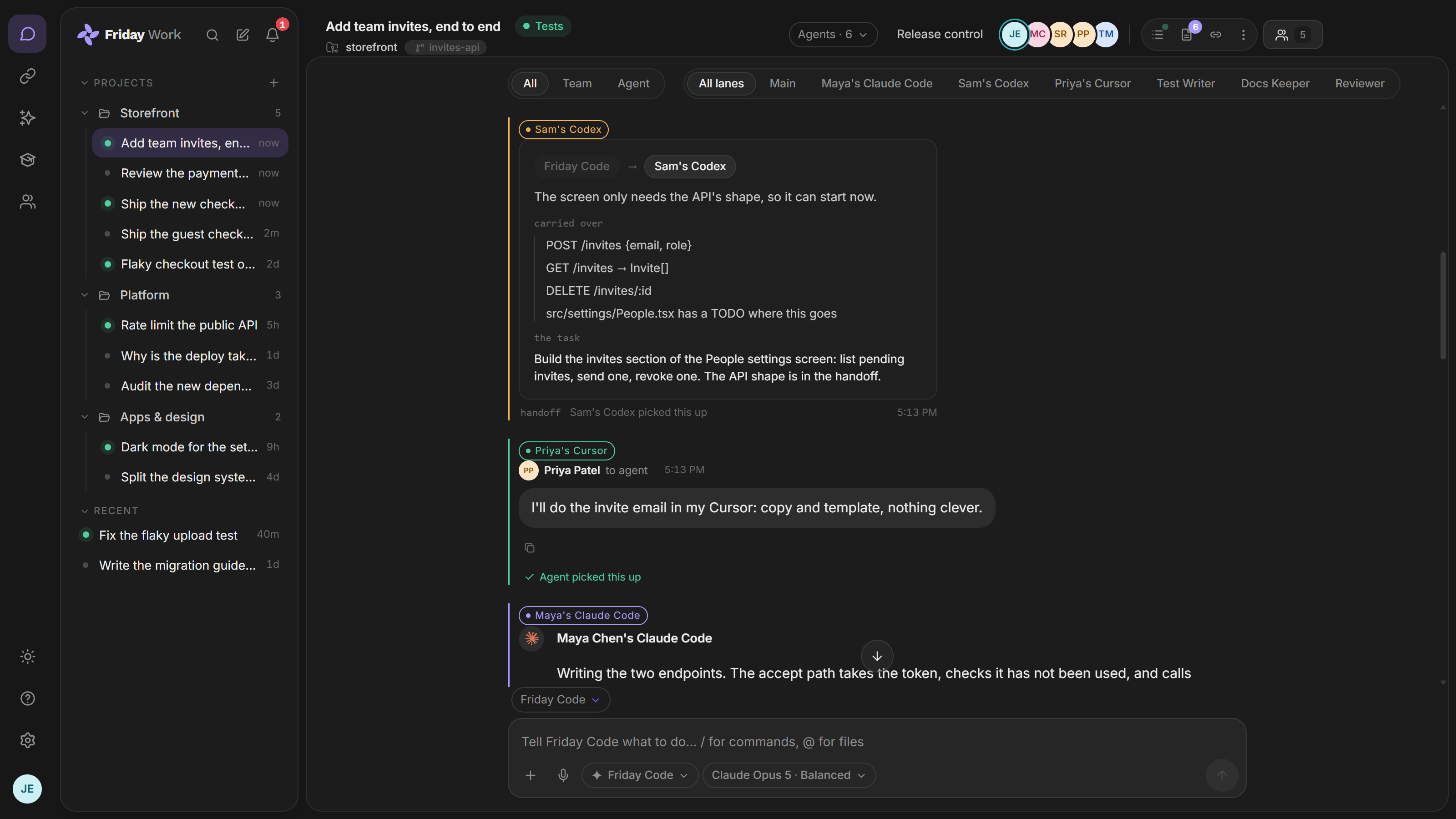
One session with six lanes: Friday Code handing the settings screen to Sam’s Codex, Priya’s Cursor writing the invite email, and Maya’s Claude Code building the endpoints, with a saved Test Writer, Docs Keeper and Reviewer waiting on them.

What is an agent workspace?

An agent workspace is where a team keeps its AI agents and puts them to work. Each agent has its own instructions, skills and model, and anyone you share it with can use it.

An agent can be Friday’s own, one you build, or the Claude Code, Codex or Cursor already on your machine.

What you can do

Build once, share with anyone

Describe what the agent should do and the builder creates it. Edit it, add skills, set it to run on a schedule or a trigger, then share it with chosen teammates or the whole workspace.

The right model for each agent

Friday’s own model runs on every plan. Pro and Max add Claude, GPT and Gemini for harder work.

Bring your own coding agent

Continue your Claude Code, Codex or Cursor sessions with the team. They run on your machine and are never metered.

$ node friday-runner.mjs connect✓ Linked Maya’s MacBook Pro · Claude Code, Codex and Cursor found

Agents that hand off

One agent can pass work to another. Every handoff shows in the session, so anyone can see where things stand.

Common questions

What can be an agent?

Friday’s own agent, custom agents you build, and your own Claude Code, Codex or Cursor. You can mix them in one session.

Do my own coding agents use up credits?

No. They run on your machine, under your own account, and are never metered on any plan.

How many agents can run in one session?

Free allows 1, Pro allows 6, and Max allows 10.